Posts

Books for Talend

There are a few very well written books available on Talend: 1. Talend Open studio Cookbook 2. Getting started with Talend 3. Talend for Big data Please do refer them

Ways to schedule Talend Job

Ways to schedule your Talend job (open studio version) : 1       Export your job as Executable .bat or .sh file : Right click your job in Repository >  Build Job >  Build Type > Standalone Job        You can Export your job as  .bat or .sh executable  which can then run on any machine without the      help of Talend. It is fully portable. You just need java. It is similar to running a java code. You can then schedule via Windows/Linux scheduler to run this executable. 2.     Export  your job as webservice : Right click your job in Repository >  Build Job > Build Type > War file                                       You can export your job as WAR file (.war) too. You must then add it in your tomcat and run as a webapp.

Perfomance tuning : Tmap Component in Talend

The settings mostly depend on the volume of data you require for processing while applying a join, i.e.,  If Lookup table have few rows: select   "Lookup model"  as Load Once .  This will load lookup data into memory only once and uses that to compare all other records from parent table.   This is a faster option as memory loading is less IF lookup table have large amount of data : Talend cant store the lookup table data in memory. you will get java heap space Execption.  To resolve this issue follow the below steps open tmap go to lookup table click on tmap settings select the value for  store temp data  property to  True  click on ok In Tmap properties basic settings  set  Temp Data Directory path  by browsing folder Go to Advance settings set   max buffer size(nb of row)  to some value based on  lookup condition data type

Different types of Facts

Fact - A fact table typically has two types of columns, foreign keys to dimension tables and measures those that contain numeric facts. A fact table can contain fact’s data on detail or aggregated level. Types of Facts - Additive: Additive facts are facts that can be summed up through all of the dimensions in the fact table. A sales fact is a good example for additive fact. Semi-Additive: Semi-additive facts are facts that can be summed up for some of the dimensions in the fact table, but not the others. Eg: Daily balances fact can be summed up through the customers dimension but not through the time dimension. Non-Additive: Non-additive facts are facts that cannot be summed up for any of the dimensions present in the fact table. Eg: Facts which have percentages, ratios calculated. Factless Fact Table:  In the real world, it is possible to have a fact table that contains no measures or facts. These tables are called “Factless Fact tables”. Eg: A fact tabl...

Different types of Dimensions

Dimension - A dimension table typically has two types of columns, primary keys to fact tables and textual\descreptive data. Types of Dimensions - Slowly Changing Dimensions:   Attributes of a dimension that would undergo changes over time. It depends on the business requirement whether particular attribute history of changes should be preserved in the data warehouse. This is called a Slowly Changing Attribute and a dimension containing such an attribute is called a Slowly Changing Dimension. Rapidly Changing Dimensions: A dimension attribute that changes frequently is a Rapidly Changing Attribute. If you don’t need to track the changes, the Rapidly Changing Attribute is no problem, but if you do need to track the changes, using a standard Slowly Changing Dimension technique can result in a huge inflation of the size of the dimension. One solution is to move the attribute to its own dimension, with a separate foreign key in the fact table. This new dimen...

Slowly Changing Dimensions

Slowly Changing Dimensions are  dimensions that change slowly over time, rather than changing on regular schedule, time-base. In Data Warehouse there is a need to track changes in dimension attributes in order to report historical data. In other words, implementing one of the SCD types should enable users assigning proper dimension's attribute value for given date. Example of such dimensions could be: customer, geography, employee. There are many approaches how to deal with SCD. The most popular are:  Type 0  - The passive method Type 1  - Overwriting the old value Type 2  - Creating a new additional record Type 3  - Adding a new column Type 0  - The passive method. In this method no special action is performed upon dimensional changes. Some  dimension data  can remain the same as it was first time inserted, others may be overwritten.  Type 1  - Overwriting the old value. In this method no history of dimension changes ...

Deploying your job - Talend

After the completion of development you have the scenario in which you want to deploy your ETL, may it be test environment or production environment. In Talend we have two widely used methods to deploy your ETL. 1. Autonomous Job The job is exported as a Java file with a .bat/.sh executable. So you can put your ETL job on any machine with java to run on it. 2. Web service  -  (WAR file) The job is exported as a .war for running it as a webservice & integrating it in your web application.

Pentaho Instaview Demo

Pentaho Instaview  is a new Enterprise Edition perspective in Pentaho Data Integration version 4.4 that allows you to quickly connect to a data source, define a slice of data to work with, and immediately visualize that data in Pentaho Analyzer Check out the demo here: http://www.pentaho.com/resources/videos/97/pentaho-instaview-demo

Difference between Jaspersoft studio & iReport

In the FAQ of  http://www.jaspersoft.com : Why is Jaspersoft Doing this? For years our community of developers asked us to support the Eclipse platform due to its popularity and capabilities. This feedback made the decision to build an Eclipse-based report designer easy. Jaspersoft users will benefit from the rich capabilities of the Eclipse platform and Eclipse developers will benefit from a complete open source BI stack to build and deploy their reports. We also aim to create a report design environment that is both powerful and intuitive so that it appeals to both the advanced and the first-time report developer. So I think this is simply a fork with the goal to provide the designer as an eclipse based application. Plus they also provide the designer as a plugin version for Eclipse: Which Eclipse releases does Jaspersoft Studio work with? The plugin version of Jaspersoft Studio can be installed on Eclipse IDE 3.5 or later. The compatible Eclipse releases are Ind...

Execution failed : Failed to generate code

This sort of error may occur in Talend making the Talend not boot properly & displaying the error. The reason for this error: There exist a job in the workspace which is not saved but the Talend application shut down unexpectedly. Resolution: 1. Create a new folder for another workspace. Change your current workspace folder associated at the start screen. 2. Import your jobs from the old workspace by using 'Import items' option.

Different Match Models in tMap with example

Unique Match:     (Also called Last match) If several matches are found in the Inner Join, i.e. the last row matching the explicit join as well as the filter will be added to the output flow. First Match: If several matches are found in the Inner Join, i.e. the first row matching the explicit join as well as the filter will be added to the output flow. All Match: If several matches are found in the Inner Join, i.e. rows matching the explicit join as well as the filter, all of them will be added to the output flow Example: deptid   sales 1           1000 2           2000 3           3000 2           5000 3           6000 Outputs: 1. Unique match deptid   sales 1           1000 2           5000 3           6000 2. All matches deptid  ...

Jaspersoft 5.1 features

Improved Language Support  with the web user interface now available in Brazilian Portuguese. New Pro Maps, Charts, and Widgets functionality  - These elements can now be rendered as HTML5, allowing you to view Fusion content rendered as HTML5. The charts, maps, and widgets are greatly improved, and provide a better visual experience. Improved Chart Export  - The chart rendering export engine has been re-written to eliminate issues with Flash objects not showing properly in export formats such as PDF. Exported charts are created as images during export, which provides visual consistency when viewing charts on various devices. Note that Jaspersoft sometimes recommends using PhantomJS as the report renderer, which can improve output or performance in some circumstances. For more information, see the JasperReports Server Administrator Guide. Ad Hoc Chart Formatting  - The Ad Hoc Editor now provides basic chart formatting options to help you make your charts more re...
Introducing Pentaho 5.0

Pentaho 5.0 includes more than 250 new features and improvements. Highlights include:  Simplified analytics and user experience New Pentaho User Console and streamlined user interface Re-designed experience for administrators Industry leading operational reporting for MongoDB Enterprise-ready big data integration Over 100 new features in Pentaho Data Integration New functionality to help IT manage huge data volumes efficiently Simplified Embedded Analytics New REST services for third-party applications New capabilities to blend big data “at the source” Architected data blending for complete and accurate analytics Deliver “analytics ready” blended data to any user

Running out of memory with tAggregateRow component

There can be situations where i have to aggregate millions of records to perform aggregate functions. Thus in such case you have two options: 1. Increase the java heap space/memory 2. Sort the incoming rows using tSortRow and then use  tAggregateSortedRow which will save the processing time used.

Null pointer exception in tmap

You might have faced a common error in Talend i.e. the  NullPointerException in tMap "Exception in component tMap_1 java.lang.NullPointerException" Solutions: 1) Make sure your columns are nullable when you define the schema. 2) The NullPointerException indicate there are some null value on lookup table, so you need to deal with the null value on corresponding columns on expression filed of tmap, for example: !Relational.ISNULL(row13.abc)? row13.xyz:row13.sss:null

Generating Date Dimension

Create a new job called date_dim . First we will define a variable for start date, because we will use this job in various projects and we might require a different start date each time: Click on the Context tab and then on the + button to add a new context variable. Give it the name myStartDate of type Date and define a value for it. Next add a tRowGenerator component to the design area and double click on it to activate the settings dialog. The idea is to create X amount of rows: The first row will hold our start date and each subsequent row will increment the date by one day. 1.        Click the + button to add a new column. Name it date and set the type to Date . 2.        Click in the Environment variables cell on the right hand side and then you will see the parameters displayed in the Function parameters tab on the bottom left hand side. 3.        Define the num...

Difference between 'Insert or Update' and 'Update or Insert'

Insert or Update: First tries to insert a record, but if a record with a matching primary key already exists, instead updates that record. Update or Insert: First tries to update a record with a matching primary key, but if none already exists, instead inserts the record. From a results point of view, there are no differences between the two, nor are there significant performance differences. In general, choose the action that matches what you expect to be more common: Insert or Update if you think there are more inserts than updates, Update or Insert if you think there are more updates than inserts.

Executing multiple commands in tSystem component

On Windows On Windows, you can execute multiple system commands at one time on a tSystem component using this format,  the different commands are connected with & symbol. cmd / c  mkdir dir1 & mkdir dir2 On Linux On Linux, you can execute multiple system commands at one time on a tSystem component using this format,  the different commands are connected with ; symbol. touch file1.txt ; touch file2.txt

Version Control with Talend Open Studio

Image
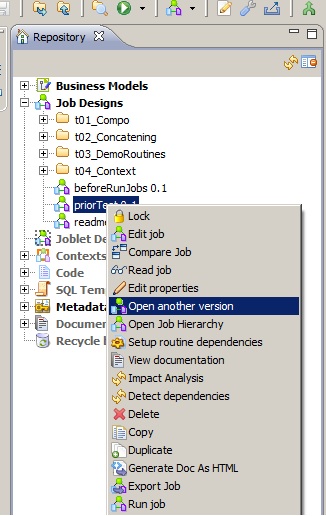
There is a feature by which we can apply version control to our jobs in Talend. By default when job is first created it has a version 0.1 attached to it. To alter the version or create a new version for the job, follow these steps 1.  Right click the job created in the repository 2. Select 'Open another version'. 3. In the new window increment the version of the job using 'm' & 'M' tabs depending upon minor or major version. 4. Check 'Create new version & open it ?' check box 5. New version of the job is opened. 6. If you want to reopen previous version of job, follow the same steps except  don't  check 'Create new version & open it ?'

Scheduling in PDI

Image
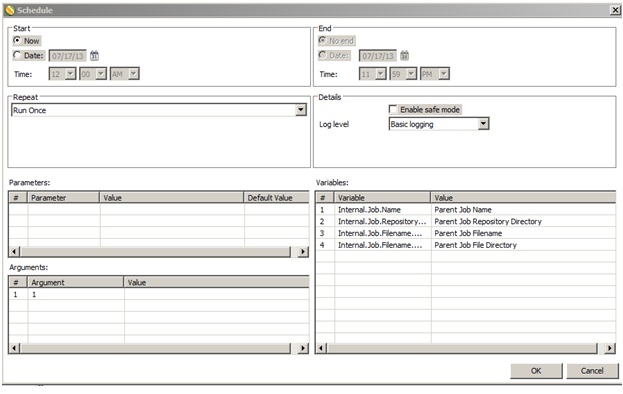
Once you're finished designing your P DI   jobs and transformations, you can arrange to run them at certain time intervals through the   DI   Server , or through your own scheduling mechanism (such as   cron  on Linux, and the   Task Scheduler  or the   at  command on Windows). The methods of operation for scheduling and scripting are   di fferent; scheduling through the  DI   Server   is done through the Spoon graphical interface, whereas scripting using your own scheduler or executor is done by calling the   pan  or   kitchen  commands. This section explains all of the details for scripting and scheduling P DI   content. You can schedule your jobs through: 1.  Data Integration (DI) Server 2. Manual scripting through pan or kitchen commands 1. DI Server This method is done through the Spoon graphical interface & is only available for Enterprise repository After you desi...