Posts

Null pointer exception in tmap

You might have faced a common error in Talend i.e. the  NullPointerException in tMap "Exception in component tMap_1 java.lang.NullPointerException" Solutions: 1) Make sure your columns are nullable when you define the schema. 2) The NullPointerException indicate there are some null value on lookup table, so you need to deal with the null value on corresponding columns on expression filed of tmap, for example: !Relational.ISNULL(row13.abc)? row13.xyz:row13.sss:null
Generating Date Dimension

Create a new job called date_dim . First we will define a variable for start date, because we will use this job in various projects and we might require a different start date each time: Click on the Context tab and then on the + button to add a new context variable. Give it the name myStartDate of type Date and define a value for it. Next add a tRowGenerator component to the design area and double click on it to activate the settings dialog. The idea is to create X amount of rows: The first row will hold our start date and each subsequent row will increment the date by one day. 1.        Click the + button to add a new column. Name it date and set the type to Date . 2.        Click in the Environment variables cell on the right hand side and then you will see the parameters displayed in the Function parameters tab on the bottom left hand side. 3.        Define the num...

Difference between 'Insert or Update' and 'Update or Insert'

Insert or Update: First tries to insert a record, but if a record with a matching primary key already exists, instead updates that record. Update or Insert: First tries to update a record with a matching primary key, but if none already exists, instead inserts the record. From a results point of view, there are no differences between the two, nor are there significant performance differences. In general, choose the action that matches what you expect to be more common: Insert or Update if you think there are more inserts than updates, Update or Insert if you think there are more updates than inserts.

Executing multiple commands in tSystem component

On Windows On Windows, you can execute multiple system commands at one time on a tSystem component using this format,  the different commands are connected with & symbol. cmd / c  mkdir dir1 & mkdir dir2 On Linux On Linux, you can execute multiple system commands at one time on a tSystem component using this format,  the different commands are connected with ; symbol. touch file1.txt ; touch file2.txt

Version Control with Talend Open Studio

Image
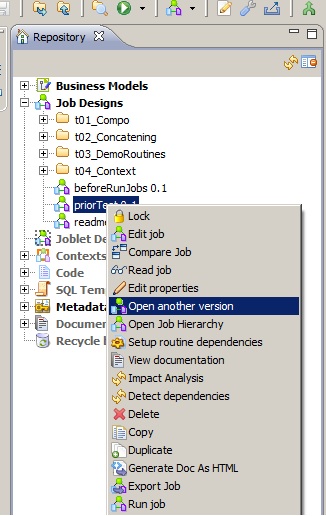
There is a feature by which we can apply version control to our jobs in Talend. By default when job is first created it has a version 0.1 attached to it. To alter the version or create a new version for the job, follow these steps 1.  Right click the job created in the repository 2. Select 'Open another version'. 3. In the new window increment the version of the job using 'm' & 'M' tabs depending upon minor or major version. 4. Check 'Create new version & open it ?' check box 5. New version of the job is opened. 6. If you want to reopen previous version of job, follow the same steps except  don't  check 'Create new version & open it ?'

Scheduling in PDI

Image
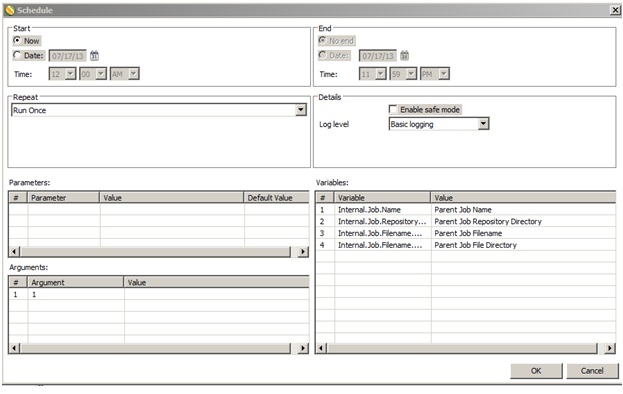
Once you're finished designing your P DI   jobs and transformations, you can arrange to run them at certain time intervals through the   DI   Server , or through your own scheduling mechanism (such as   cron  on Linux, and the   Task Scheduler  or the   at  command on Windows). The methods of operation for scheduling and scripting are   di fferent; scheduling through the  DI   Server   is done through the Spoon graphical interface, whereas scripting using your own scheduler or executor is done by calling the   pan  or   kitchen  commands. This section explains all of the details for scripting and scheduling P DI   content. You can schedule your jobs through: 1.  Data Integration (DI) Server 2. Manual scripting through pan or kitchen commands 1. DI Server This method is done through the Spoon graphical interface & is only available for Enterprise repository After you desi...

34 Subsystems of ETL

In this, and in the next series of posts, I will be exploring the 34 subsystems of ETL Data Integration as defined by the Kimball Group. I introduce the subsystems in this post, and then I will discuss how each fits (or does not fit) into Talend & PDI . The subsystem concept is a best-practice initiative formulated by The Kimball Group to help organizations design effective and efficient Data Integration environments for Data Warehousing using the Dimensional Model. The Kimball Group categorizes the subsystems into 4 distinct groups: Data Extraction, Cleansing and Conforming Tasks, Data Delivery, and Management. Data Extraction 1. Data Profiling Talend:  Talend has a separate tool for data profiling & data quality called 'Talend Open Studio for Data Quality' Pentaho:  'DataCleaner' plugin is available for download for this purpose 2. Change Data Capture (CDC) Talend:  Talend has a inbuilt trigger based CDC feaature which can be applied easily. (En...